What is Verified Mark Certification (VMC)?
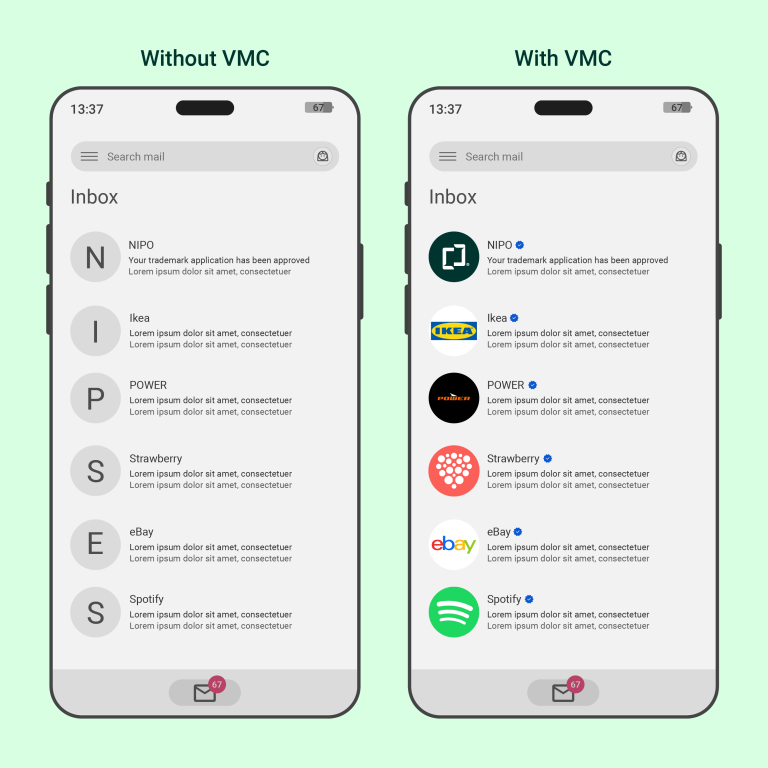
Verified Mark Certification is a digital certificate that links a registered trademark to your email domain. When you use VMC, your logo appears as a clear and verified sender mark in the recipient’s inbox.
Why should you use VMC?
Fake emails and phishing are common threats. With VMC, you reduce the risk of your emails ending up in spam and make it easier for recipients to recognize you as a trusted sender. VMC also helps strengthen and make your brand visible across digital channels. The solution combines secure email authentication with visual identity, providing both better protection against email fraud and increased visibility.

Key benefits of VMC
- Visible logo that strengthens your brand in every email
- Increased email security and protection against phishing
- Professional and trustworthy impression for recipients
How VMC looks in practice
With VMC, the sender’s logo appears in full color and in its original form. A small icon indicates that the logo is verified. In Gmail, the icon appears as a blue, stylized circle with a clear checkmark in the center. Other email clients may use similar icons with different colors and shapes. Recipients can click on the icon to view detailed information, for example: "The sender of this email has verified that they own the domain and the logo in the profile image". This makes VMC a clear visual signal that the sender is authentic, while preserving the brand’s visual identity in the email.
How to get VMC
To obtain VMC, you need to secure your email domain and the rights to your trademark. Here’s a step-by-step guide:
- Secure the domain with DMARC – To prevent others from misusing your email domain, you need to implement a properly configured DMARC setup. DMARC acts as a lock on your email domain, preventing anyone else from sending emails in your name. This gives you control over your emails and ensures they are more secure.
- Register your trademark – You must have a valid registered trademark to apply for VMC. Registration provides legal trademark protection and the right to display your logo in emails. If you register your trademark with the Norwegian Industrial Property Office, it becomes automatically available in the WIPO Global Brand Database. This forms the basis of your digital trademark.
- Apply for VMC – Once your domain and trademark are secured, you can apply for a sender logo certificate through an approved provider such as DigiCert or Entrust. You must document ownership of both the domain and the trademark. It may be helpful to use an IP advisor or certification specialist to ensure the process goes smoothly.
- Activate and display the logo in email – After the certificate is approved, activate it in your email system. The logo will then appear as a verified sender logo in the recipient’s inbox, if their email client supports VMC. Displaying your brand in email strengthens your company’s reputation and highlights your trademark professionally.


